

For years, the Compare feature in Ingage has helped sales teams create more engaging and effective presentations. By visually showing the difference between options, products, or project results, sales reps can guide customers through important decisions with clarity and confidence.
From before-and-after project photos to product comparisons, Compare allows teams to turn complex information into simple visual stories.
Until now, Compare was primarily designed to work with images or videos on each side of the component. While this worked well for visual comparisons, many teams wanted the ability to add more context directly within the comparison.
That’s exactly what this update delivers.
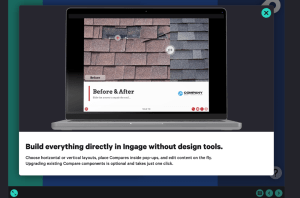
Build More Flexible Comparisons Inside Ingage
The updated Compare feature allows teams to build more dynamic and interactive sales presentations directly inside Ingage.
Instead of relying on static images created outside the platform, you can now add:
- Text
- Logos
- Buttons
- Multiple images
- Additional presentation elements
directly inside the Compare component.
This makes presentations easier to update, faster to build, and easier for sales teams to manage. Your entire presentation workflow stays inside Ingage sales presentation software.
More Ways to Use Compare in Sales Presentations
With the expanded capabilities, Compare is no longer limited to traditional before-and-after visuals.
Sales teams can now use the feature to:
- Reveal messaging or product details interactively
- Highlight promotions or key offers
- Compare product options or service tiers
- Walk customers through visual transformations
- Present layered storytelling moments in a swipe-driven format
This flexibility helps sales teams adapt presentations in real time based on the conversation.

New Features and Enhancements
Compare Inside Pop-Ups
You can now add a Compare component inside a pop-up, making it easy to introduce comparisons exactly when they are needed in a presentation.
This helps presenters control when and how information is revealed during the sales conversation.
Vertical or Horizontal Comparisons
Designers now have the ability to choose between vertical and horizontal layouts, providing more flexibility when designing presentation pages.
This allows Compare to fit more naturally into different presentation formats.
Updated Templates
New presentation pages and pop-up templates will include the updated Compare feature by default. This helps teams begin using the new functionality immediately.
Optional Upgrade for Existing Comparisons
Existing presentations will continue working exactly as they do today.
If you want to take advantage of the new features, you can upgrade older Compare components using the built-in update utility.
Important Update Requirement
Presentations using the updated Compare feature require the latest version of Ingage.
If someone on your team is using an older version of the app, the new Compare component may not display correctly.
Before sharing presentations with the updated feature, make sure your team updates Ingage:
- iOS users: Update through the App Store
- Desktop users: Select Check for Updates from the Ingage desktop menu
Want step-by-step instructions on how to start using the updated Compare feature?
Visit our Help Desk guide to the Compare component for setup instructions and best practices.
A Better Way to Show the Difference
Visual storytelling is one of the most effective ways to communicate value during a sales presentation.
The updated Compare feature expands what is possible inside Ingage, giving sales teams more flexibility to guide conversations, highlight differences, and present information in a more engaging way.
We’re excited to see how teams use this feature to create even stronger interactive sales presentations.
See What Ingage Can Do for Your Sales Team
The updated Compare feature is just one example of how Ingage helps sales teams create more engaging, interactive presentations that close more deals.
If you’re not using Ingage yet, our team would love to show you how it works.
Schedule a demo with our team to see how Ingage can help you create powerful presentations that win more business.
