

The sales landscape is rapidly evolving, and businesses must adapt their strategies to meet customers’ changing needs and expectations. With shorter attention spans and increased digital engagement, traditional sales presentations are no longer as effective. To succeed in 2025 and beyond, companies must master creating interactive digital presentations that captivate and convert prospects.
This guide will provide actionable strategies and best practices for designing engaging, educational and persuasive digital presentations that drive sales results. By leveraging the power of interactivity, multimedia and data-driven insights, you can stand out from the competition and forge stronger connections with your target audience.
Understanding Interactive Digital Presentations
Digital presentations refer to slide decks, documents or multimedia experiences delivered electronically rather than using traditional physical slides or handouts. These presentations leverage digital technologies and platforms to engage audiences in a more dynamic and immersive way. What makes a digital presentation “interactive” is including features and elements that allow the audience to actively engage with the content.
The key difference between static and interactive presentations is the level of audience engagement and retention. Like traditional slide decks, static presentations tend to be more one-dimensional, with the presenter controlling the pace and flow of information. This can lead to lower audience engagement and reduced information retention.

In contrast, interactive digital presentations encourage the audience to actively participate and discover content on their terms. This active engagement has been shown to increase audience attention, comprehension, and the likelihood that key messages will be remembered. By enabling the audience to interact with the content, these presentations create a more immersive and memorable experience.
Types of Interactive Content for Digital Presentations
The following are examples of interactive content you can include in digital presentations to reinforce key messages, engage viewers and drive desired outcomes:
Stories
Incorporating narrative elements, such as customer testimonials or case studies, helps make your presentation more relatable and memorable for the viewer. Stories humanize your message and demonstrate the real-world impact of your solutions, which can be highly persuasive in the sales process.
Quizzes
Interactive quizzes and assessments allow you to gauge the audience’s knowledge, spark discussion, and reinforce key takeaways. This engages the viewer and provides valuable insights that can help you tailor your sales approach.
Polls and Surveys
Real-time polls and surveys enable you to gather feedback and insights from your audience. You can then use this information to adapt your presentation on the fly. This two-way interaction helps the viewer feel heard and demonstrates your responsiveness to their needs.
Interactive Infographics
Dynamic, clickable infographics bring data to life, allowing viewers to explore information at their own pace. This visual engagement can make complex topics more accessible, supporting the educational and persuasive aspects of the sales process.
Clickable Demos
Interactive product demos or simulations let the viewer explore your offerings firsthand, even when they cannot physically access or view the products. For instance, this can be highly valuable in the case of large machinery, customized products that are made to order or when the prospect’s location does not allow for an in-person demonstration. By enabling the viewer to interact with your solutions virtually, you can build trust and showcase its capabilities in a more tangible way.
Real-Time Data Visualizations
Live, up-to-date data visualizations engage the viewer and underscore the relevance and timeliness of your message. This can be particularly impactful in sales presentations where data-driven insights justify the value of your solutions.
Videos
Embedded videos demonstrating your products, services, or thought leadership add visual interest and depth to your presentation. Videos can effectively convey complex information, build emotional connections, and reinforce key messages.
Calculators and Tools
Interactive calculators or tools can help the viewer understand the value or impact of your solutions. Home buyers, for instance, may want to gauge repayment periods and amounts in regard to their upfront deposit. By providing instant, personalized insights, you can better align your offerings with the viewer’s specific needs and challenges.
Games
When strategically applied, gamifying your presentation with interactive challenges or mini-games can foster a fun, memorable experience. This helps to break up the traditional sales pitch and makes the viewer more receptive to your message.

Interactive Maps
Clickable, interactive maps can be used to showcase geographic data, product availability or service locations in a visually compelling way.
Interactive Webinars and Live Streams
Combining the power of live, interactive presentations with the reach of digital platforms can create a highly engaging and personalized sales experience. The interactive elements allow for real-time feedback, discussion and tailored content delivery. It also builds trust and fosters a sense of community, increasing brand loyalty.
Strategies to Engage Prospects With Interactive Features
In today’s digital-first culture, viewers have shorter attention spans and are constantly bombarded with competing stimuli. It’s too easy for them to get distracted or simply close out of a presentation if it fails to capture their interest. This makes it critical to implement strategic practices that keep the audience engaged. Empowering the viewer to interact with the content can foster a more immersive experience and combat the challenge of waning attention.
Best practices for incorporating interactive elements during digital presentations include:
- Use clickable hotspots that allow the viewer to navigate and discover content at their own pace.
- Incorporate polls, quizzes and feedback mechanisms that prompt active audience participation.
- Weave in compelling narratives, such as customer testimonials or use cases, to make the content more relatable.
- Optimize your digital presentation for seamless viewing and interaction on mobile devices, where many viewers will access the content.
- Break up the presentation into manageable, bite-sized segments to sustain the audience’s attention. This prevents them from becoming overwhelmed or disengaged.
- Monitor audience engagement metrics and feedback to continually refine and improve the interactive elements of your digital presentations.
Educating Clients: The Role of Interactivity in Knowledge Transfer
Interactive elements in digital presentations can be compelling for educating prospects about a product’s value. These elements foster better understanding and retention of information, especially for complex products or services. Benefits of interactive elements for product and service education include:
- Improved comprehension
- Enhanced retention
- Personalized learning
- Increased engagement
Techniques for breaking down complex topics include:
-
- Modular Approach. Break down complex products or services into smaller, digestible segments that prospects can explore through interactive features like expandable menus or step-by-step guides.
- Storytelling. Use narrative elements, such as customer testimonials or use cases, to illustrate how your offerings solve real-world problems in a relatable manner.
- Multimedia Integration. Incorporate a variety of media, including videos, animations and interactive visualizations, to explain complex concepts from multiple angles.
- Gamification. Introduce interactive games or challenges that allow prospects to learn by doing.
- Interactive Walkthroughs. Interactive walkthroughs guide prospects through step-by-step tutorials or use cases, demonstrating how your products or services work in an immersive way. These walkthroughs can incorporate clickable hotspots, annotations and other interactive elements that allow prospects to navigate the content at their own pace and focus on the areas most relevant to them.
- Explainer Videos. Explainer videos use a combination of visuals, narration and animation to provide a clear, concise overview of products or services. By leveraging the power of multimedia, you can communicate key messages in a way that is both educational and entertaining for the prospect.
- Interactive Demonstrations. By enabling prospects to interact with your solutions directly, you can foster a deeper level of comprehension. This hands-on experience helps them better understand the features, functionality and potential fit for their specific needs.

Designing for Engagement: Best Practices for Visual Appeal and Usability
The design of your digital presentation is just as important as the interactive elements themselves. A clean, well-organized layout that balances interactivity with simplicity can enhance the viewer’s experience and ensure the interactive features effectively support your message rather than detract from it. Consider the following best practices when designing your digital presentations:
- Avoid overwhelming the viewer with too many interactive elements. Balance interactivity with simplicity.
- Maintain a clean, uncluttered design.
- Balance the distribution of text, visuals and interactive features on each slide or page. This will help guide the viewer’s attention.
- Make sure the interactive elements directly support and reinforce the key points. Avoid interactivity for the sake of interactivity.
- Optimize for smooth navigation on all device types and screen sizes—desktop, tablet and mobile.
- Leverage consistent branding, design principles and language throughout the presentation.
- Incorporate intuitive UI patterns, such as hover effects or scrolling interactions, to make the interactive features easy to discover and use.
- Continuously test and iterate.
Increasing Conversion Rates With Interactive Calls-to-Action (CTAs)
Interactive CTAs play a crucial role in guiding prospects through the sales funnel and driving them to take immediate action. By strategically incorporating interactive CTAs throughout your digital presentation, you can:
- Nurture Leads. Prompt prospects to download additional content, schedule a demo or sign up for a newsletter.
- Encourage Immediate Action. Incorporate time-sensitive or urgency-driven interactive CTAs, such as “Book a Call Now” or “Claim Your Discount.”
- Gather Valuable Insights to inform your sales and marketing strategies.
Follow these best practices when incorporating interactive CTAs:
- Position CTAs at strategic points throughout the presentation, such as after introducing a problem or showcasing a solution.
- Time your CTAs to appear when the prospect is most engaged and receptive.
- Use eye-catching interactive elements such as buttons or animated CTAs to capture the prospect’s attention.
- Provide clear next steps.
- Optimize buttons, forms and other actionable content for mobile.
The Future of Interactive Digital Presentations in Sales
Looking forward, the integration of emerging technologies like AI, AR and VR will continue to enhance the interactivity and immersion of digital presentations. While many of these technologies are already being used, they will become more easily accessible and realistic with further development.
AI-powered features include intelligent chatbots that engage prospects in real-time dialogue. Additionally, AI offers instant personalized content recommendations and automated analysis of audience engagement data to optimize presentations on the fly.
AR and VR will enable increasingly interactive virtual or remote experiences. These technologies allow prospects to visualize products in 3D and participate in virtual product demonstrations. Participants and sales reps can even collaborate remotely as if they are in the same physical space.
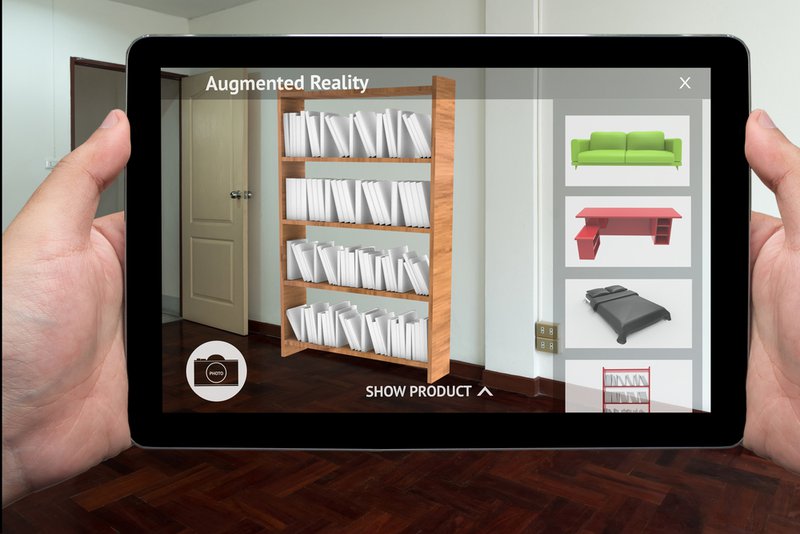
AR technology allows you to integrate virtual elements into the real-world environment. This lets the viewer see products or solutions in their actual size and context and customize or configure products virtually. This offers prospects a personalized experience and a better sense of the available options. For instance, homeowners can see what different kitchen layouts will look like in their current home before making a final decision and starting the costly renovation process. Similarly, users can see what other furniture pieces will look like in each room before making a purchase.
New sales technology will blur the lines between the digital and physical worlds, creating a truly immersive and highly convenient experience.
Unlocking Sales Success With Ingage
Effective digital presentations are crucial for today’s sales professionals. The key is to approach your digital presentation comprehensively. This involves considering not only the visual appeal and delivery but also the underlying sales strategies and audience insights that drive real business impact.
At Ingage, we’ve designed cutting-edge interactive presentation software that also serves as a content management platform and collaboration tool to help sales and marketing teams elevate customer engagement and drive sustainable growth. With intuitive features and seamless integrations, Ingage strikes a balance between ease of use and customization. Besides creating professional, on-brand presentations, Ingage enables you to add interactive elements such as action buttons, polls, quizzes and clickable hotspots.
Teams can collaborate on presentation content from anywhere, and analytics features allow managers to gain insights into sales performance and presentation effectiveness. Additionally, Ingage’s integration capabilities with other business tools enable uniform data sharing, streamline cross-functional workflows, improve data accuracy, reduce task duplication and improve efficiency.
Furthermore, Ingage enables you to leverage referral, sales, analytics, marketing and financing capabilities for maximum results. Ready to transform your sales processes? Schedule a free demo today.